




Have question in mind?
Search from our common FAQs
General queries FAQ's
-
How can I delete my Gooprep Tutor or Learner account?
If you wish to delete your Gooprep account, please send an account deletion request to admin@goprep.com.
To process your request, kindly include the following information:
- Full Name
- Email Address linked to your Gooprep account
- Reason for Account Deletion
Once we receive and verify your request, your account will be deactivated within 24 hours.
Please note that deleting your account may result in the loss of access to your profile, courses, learning history, tutoring sessions, and other account-related data.
If you have any questions or require assistance, please contact us at admin@gooprep.com or support@gooprep.com
-
Harassment Policy on Gooprep
This policy explains what counts as harassment on Gooprep, how to recognize it, how to report it, and what happens after a report is submitted.
Gooprep is committed to maintaining a safe, respectful, and inclusive learning environment for all tutors and students. We enforce a zero-tolerance policy toward harassment, abuse, or discrimination of any kind.
1. What Is Harassment?
Harassment on Gooprep includes any unwanted, repeated, or offensive behavior by a student or tutor that causes distress, fear, or disrupts a professional learning environment.
This includes, but is not limited to:
- Threats or intimidation
Any behavior or message intended to threaten, coerce, or intimidate another user. - Sexual harassment
Unwanted sexual advances, sexually explicit messages or images, repeated or inappropriate personal compliments, or behavior that shifts interaction from professional to personal or romantic. - Cyberstalking or obsessive monitoring
Repeated, unwanted contact or monitoring across Gooprep or other digital platforms. - Doxxing
Sharing someone’s private or personal information with the intent to cause harm or distress. - Abusive or degrading language
Insults, slurs, hate speech, persistent profanity, or language meant to demean or humiliate. - Discrimination or hate speech
Harassment based on protected characteristics such as gender, gender identity, sexual orientation, race, nationality, religion, disability, or any other protected status.
Harassment may occur through messages, video lessons, reviews, or any other form of communication on or related to Gooprep.
If someone’s behavior makes you uncomfortable, we encourage you to report it.
2. How to Recognize Harassment
Harassment usually involves:
- Repeated or unwanted behavior
- Language or actions that cause fear, discomfort, or distress
- Conduct that crosses professional boundaries
Harassment does NOT include:
- Respectful, one-time professional communication
- Constructive feedback delivered appropriately
- Cultural or personal expression without harmful or derogatory language
When in doubt, trust your judgment — if something feels inappropriate, it’s worth reporting.
3. How to Report Harassment
If you experience or witness harassment, please report it as soon as possible.
Contact Gooprep Support
You can get in touch with our support team directly here:
🔗 https://gooprep.com/contact-us/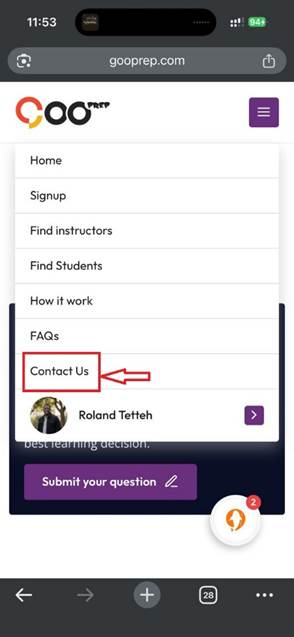
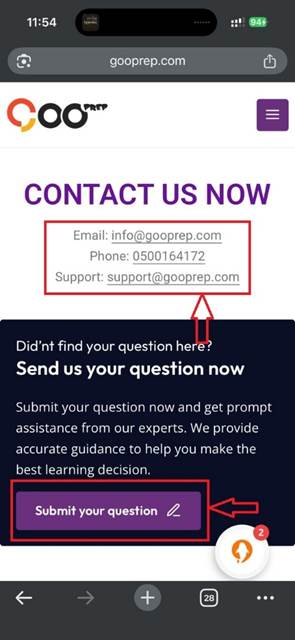
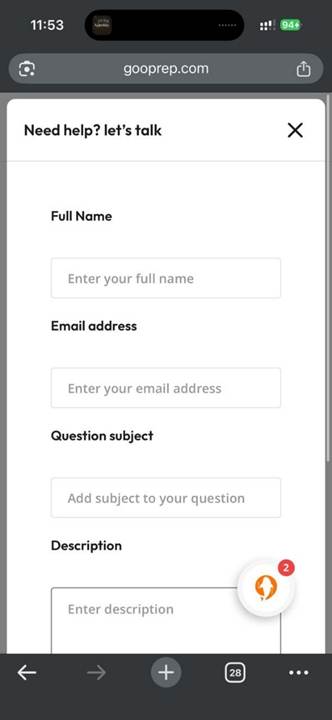
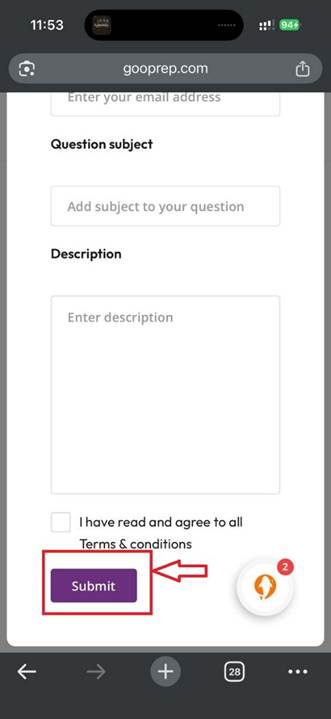
- Follow the steps to submit a report
Block a User (Optional)
- Open your messages
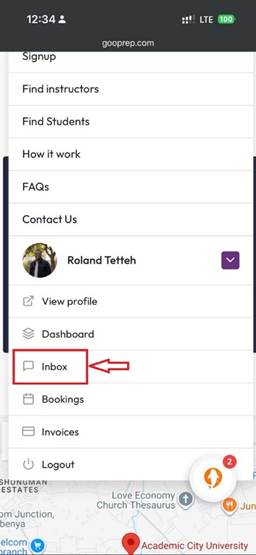
- Select the conversation
- Choose Block
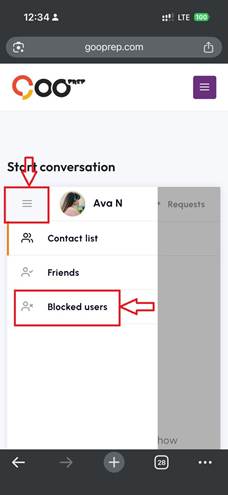
What to Include in Your Report
If available, please provide:
- Name of the person involved
- Description of what happened
- Where it occurred (chat, lesson, review, etc.)
- Date and time
- Screenshots or recordings
Anonymous reports are accepted, but providing your details helps us investigate more effectively.
4. What Happens After You Report?
Once a report is submitted:
- Gooprep’s Trust & Safety team reviews the case
- Relevant evidence is assessed (messages, lesson history, content)
- The investigation is handled confidentially
- You’ll receive an update once a decision is made
We aim to act promptly and fairly in every case.
5. Consequences for Harassment
Depending on the severity, Gooprep may take actions including:
- Temporary or permanent account suspension
- Removal of offending content
- Permanent removal from the platform
- Cooperation with legal authorities in serious cases
6. Appeals Process
If you believe a decision was made in error:
- Submit an appeal through Gooprep Support within 7 days
- A different reviewer will reassess the case and any new evidence
- The final decision will be communicated and is binding
We’re Here to Help
Your safety matters. Gooprep can only thrive when everyone feels respected and protected. If you ever feel uncomfortable or unsafe, please reach out — we’re here to support you every step of the way.
- Threats or intimidation
-
Guidelines for First Lessons on Gooprep
Gooprep expects all tutors to be professional, punctual, and prepared for every scheduled lesson. This is especially important for first lessons and trial sessions.
For a new student, a missed first lesson can be disappointing and frustrating. It also affects trust, not just in one tutor, but in the Gooprep community as a whole.
What happens if a tutor misses a first or trial lesson?
If a tutor does not attend a scheduled first or trial lesson, the student may report that the lesson did not take place. When this happens:
- Gooprep will notify the tutor via email and their tutor dashboard
- The tutor’s profile may be temporarily hidden from new students
- While hidden, new students cannot book lessons with the tutor
- Existing students can continue lessons as normal
Repeated missed first or trial lessons may lead to longer visibility restrictions and, in serious cases, account suspension.
Progressive actions for missed trial lessons
Gooprep applies graduated actions to encourage reliability and professionalism:
- 1st missed trial: Profile may be hidden until the tutor reviews guidance on managing availability
- 2nd missed trial: Profile may be hidden for a short period (2 weeks) and require completion of an attendance-related tutorial
- 3rd missed trial: Longer temporary profile restriction (4 weeks)
- Repeated missed trials: Extended restrictions or suspension from accepting new students
The more missed lessons recorded, the longer the restriction may last.
What if a student’s report is incorrect?
If you believe a missed-lesson report was made in error, contact Gooprep Support as soon as possible. The team will review the case and take appropriate action.
How to avoid missing lessons
To stay visible and successful on Gooprep, we recommend that tutors:
- Keep their calendar and availability up to date
- Add time off in advance when unavailable
- Avoid very short-notice bookings if they are difficult to manage
- Check dashboard notifications and messages regularly
- If an emergency occurs, communicate early with the student to reschedule or cancel properly
Clear communication and good calendar management help prevent misunderstandings and protect your profile.
Keep growing on Gooprep
Gooprep provides resources and guides to help tutors:
- Attract more students
- Improve lesson quality
- Manage schedules effectively
- Highlight skills and experience
Browse the Tutor Help Center and FAQs to keep improving and growing on the platform.
-
How do I set up my availability on GooPrep so students can book me?
You can set your availability on GooPrep using your calendar. This allows students to see when you’re available and book lessons with you.
Step-by-step guide
- Visit www.gooprep.com and log in to your account.
- Go to your Profile.
- Under Profile Settings, click on My Calendar.
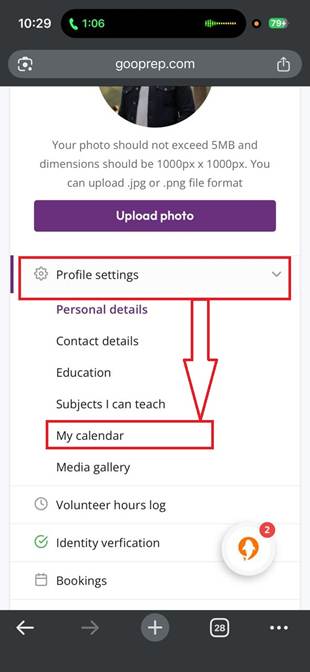
- Below the calendar, you’ll see Booking Details.
- Click Add / Edit Booking.
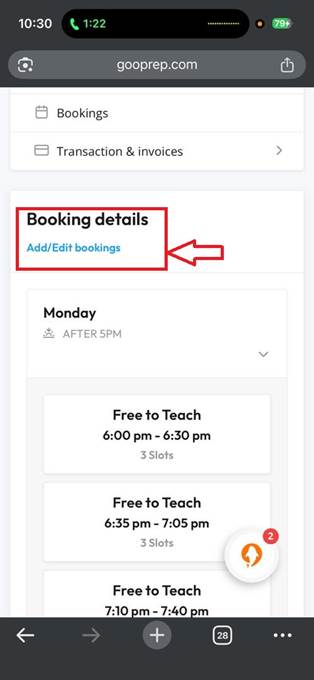
Adding your available time slots
- Click on Add Time Slot.
- Choose the days you’re available.
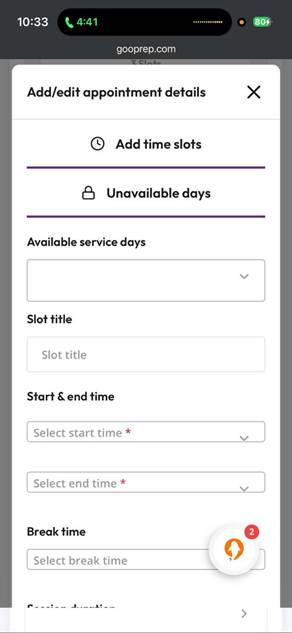
- Add a title for your availability
- Example: Maths Lessons, Available for Tutoring, or Free Time Slot
- Select your start time and end time.
- If you want to include a break, you can add it here.
- Choose your session duration (you can select any duration).
- Set the number of appointment spaces:
- 1 for one-on-one sessions
- 2 or more if you allow multiple students
- You can also customize how many students can book that time slot
Final step
- Click Generate Time Slot to save your availability.
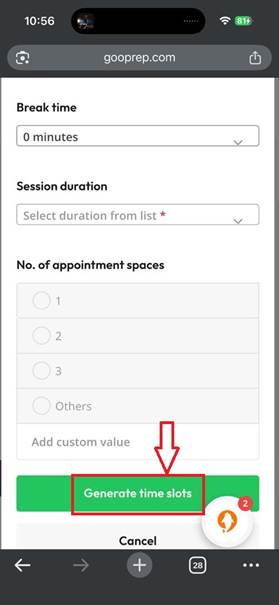
Once saved, students will be able to see your available times and book lessons with you.
-
How to Choose the Right Price on Gooprep
Learn how pricing affects your visibility, bookings, and income — and when to adjust it
Why Your Starting Price Matters
When you’re just starting on Gooprep, your price plays a big role in how often students book first lessons with you. The good news is that you’re in full control.
Gooprep allows tutors to set their own prices, and the platform’s search system supports tutors who perform well at their chosen rate — not just those with the lowest prices.
Your goal is to choose a price that helps you get booked while reflecting your skills and experience.
What to Consider When Setting Your Price
Before choosing your starting rate, think about the following:
1. Your experience and profile strength
New tutors often start with a lower price to attract their first students and build trust. Without reviews or regular students yet, pricing too high can reduce bookings.
As you gain experience, confidence, and positive feedback, you can gradually increase your rate.2. Student Expectations
Students are more likely to book when they feel your price matches the value of your profile — including your:
- Qualifications
- Teaching experience
- Subject expertise
- Teaching style
A balanced price improves your chances of bookings.
3. Similar tutor prices
Check what other tutors in your subject area and experience level are charging on Gooprep. This gives you a realistic benchmark and helps you stay competitive.
4. Gooprep’s commission
Gooprep takes a commission from each lesson. Make sure your chosen price still works for you after commission is deducted.
As you teach more lessons on Gooprep, your commission rate may decrease over time — increasing your take-home earnings.
How Gooprep’s Search Ranking Works
Gooprep’s search system does not favor cheap or expensive tutors. Instead, it rewards tutors whose profiles convert well at their current price.
The system looks at:
- How attractive your profile is to students
- How likely students are to book lessons with you at your set price
This means that simply raising or lowering your price won’t automatically improve your ranking — what matters is how students respond to that price.
Example
- Tutor A raises their price and still attracts bookings → visibility improves
- Tutor B raises their price and bookings drop → visibility may decrease
The same price change can affect tutors differently.
Can I Change My Price Later?
Yes — and you should. We encourage tutors to review their pricing when they:
- Start receiving regular first time bookings
- Build strong reviews
- Gain more teaching experience
- Establish a base of recurring students
If bookings slow down, you can also temporarily lower your price to attract new students.
⚠️ Important note on existing students
If you lower your price to attract new students, avoid changing the price for existing students immediately after a first lesson. Sudden changes can cause confusion and lead to negative reviews.
Best practice:
- Wait at least 90 days before updating prices for current students
- Always communicate price changes clearly in advance
Final Tips for Setting a Smart Starting Price
- Start confidently: Choose a price that reflects your skills but helps you get early bookings
- Study your competition: Look at tutors with similar experience and subjects
- Consider location: Pricing expectations may vary depending on where your students (and you) are based
- Focus on conversions: Bookings matter more than having a “high” or “low” price
- Be flexible: Adjust your rate as your profile grows
- Put students first: Clear communication around pricing builds trust and protects your reviews
-
How do I add my Education to my Gooprep profile?
Before you start, please note that Gooprep has specific requirements for education documents.
What Gooprep accepts
We accept:
Undergraduate certificates
Postgraduate diplomas
Certificates from accredited higher education institutions
Whether you’ve completed your program or are still in the process, your certificate is acceptable.
The types of education we look for include:
- Teaching degrees
- Subject-related degrees
- Other relevant academic or professional degrees
What Gooprep does NOT accept
Please do not upload:
Academic transcripts
Student ID cards
Letters of recommendation
Syllabus or lesson curricula
These documents will not be approved.
How to add your education (step by step)
- Go to www.goprep.com and log in to your account.
- Open your Profile.
- On the left-hand side under Profile Settings, click Education.
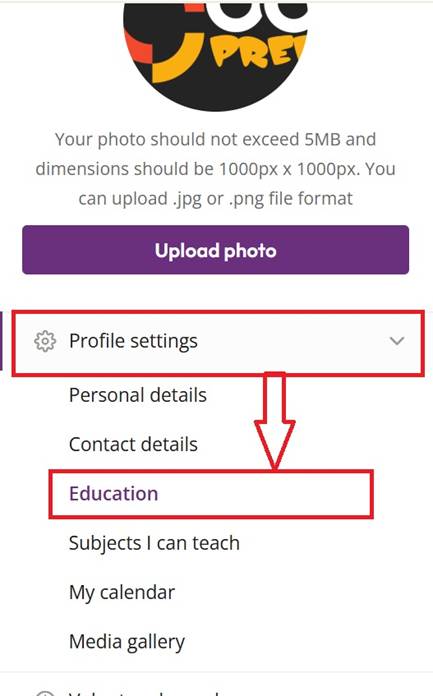
- On the top-right corner of the page, click Add Education.
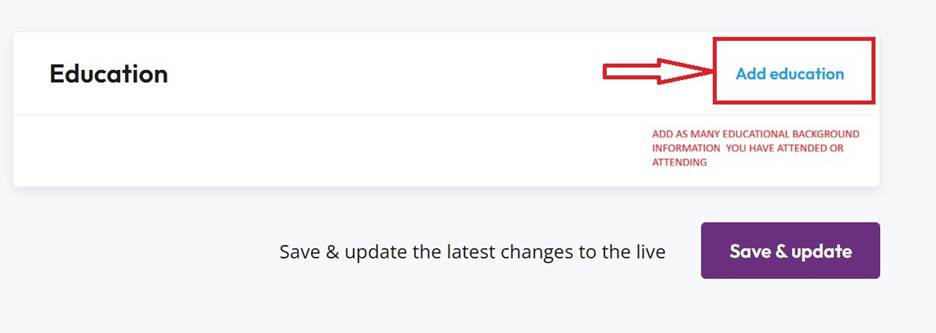
- A pop-up window will appear. Enter:
- The institution you attended
- The qualification or diploma earned
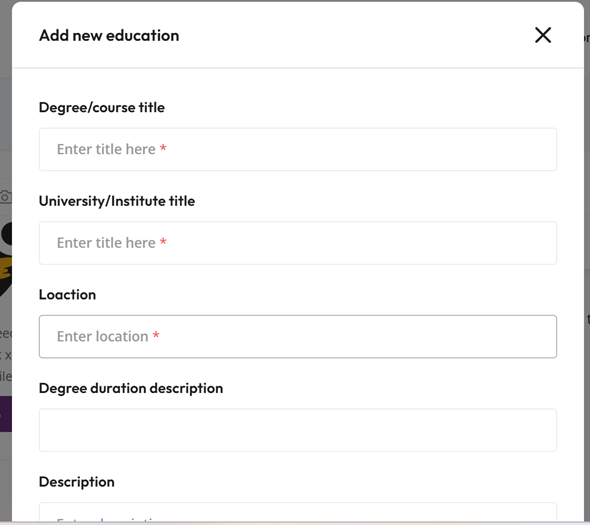
- Your start date
- Your completion date (or expected completion date)
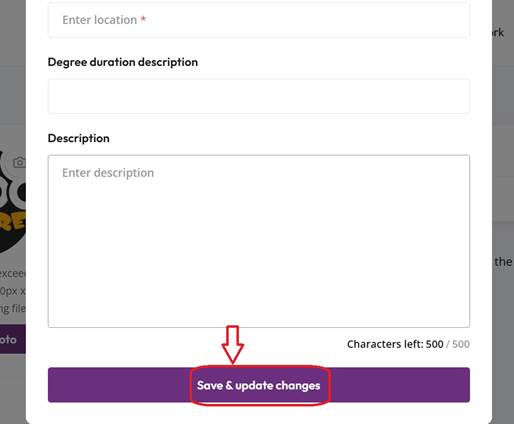
- Save your information — and you’re done.
Can I add more than one educational qualification?
Yes! You can add multiple education entries, including:
- Junior High School
- Senior High School
- University
- Training college
- Any other recognized education or certification
Simply repeat the steps above for each qualification.
Adding your education helps build trust with students and improves your profile visibility. Make sure all details are accurate before submitting.
-
Where can I upload my certificate and credentials on Gooprep?
You can upload your certificates and credentials directly from your Gooprep dashboard by following the steps below:
Step-by-step guide
- Visit www.goldprep.com and open the Gooprep platform.
- If you are a first-time user, click Get Started, then select Join Us Now to create an account (since you do not yet have login credentials).
- If you already have an account, simply log in with your credentials.
- After signing up or logging in, go to your dashboard.
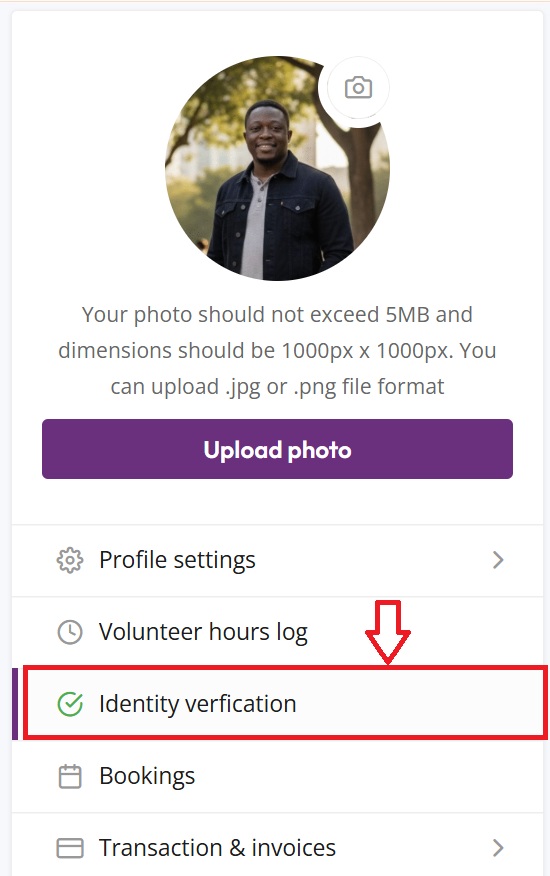
- Scroll down to the bottom-left side of the page and click on Identity Verification.
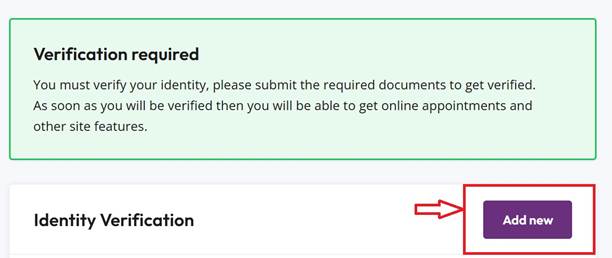
- On the top-right corner of the Identity Verification page, click Add New.
- Scroll down until you see Photo Verification and Add Attachment.
- Click Add Attachment — this is where you upload your certificates and credentials, as shown in the image provided in the blog.
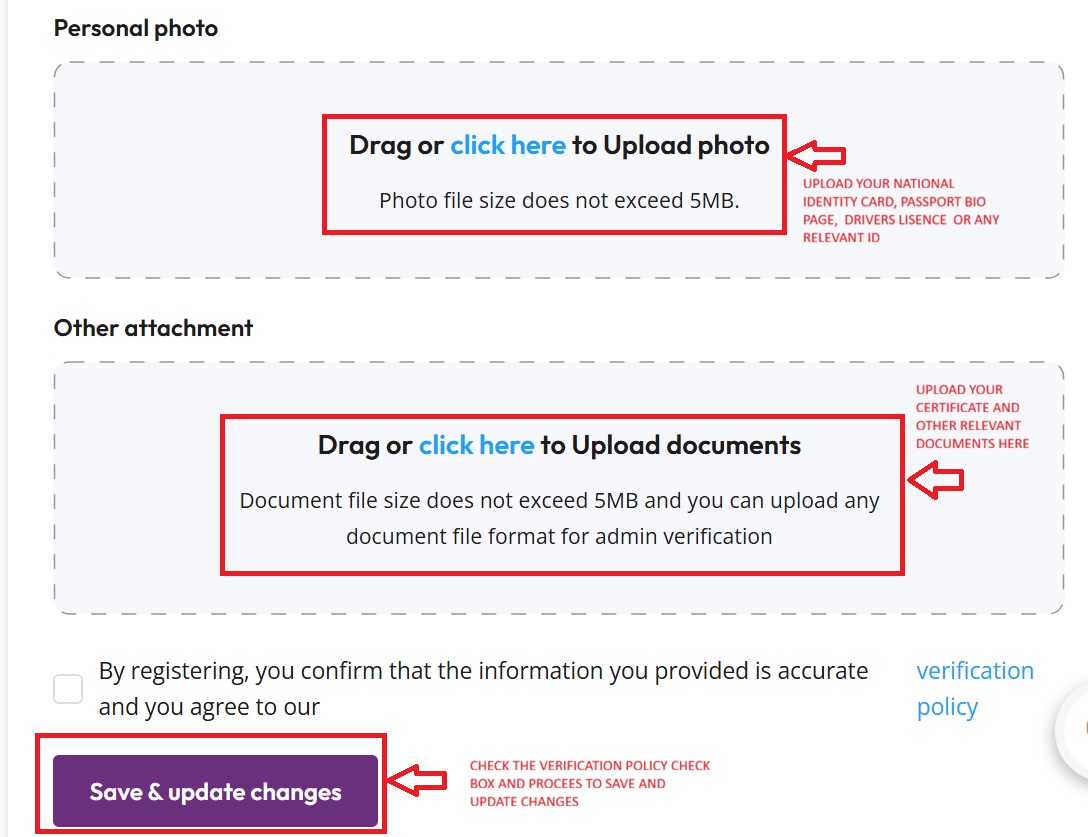
Once uploaded, your documents will be reviewed as part of the verification process.
-
Choosing a Good Profile Photo
Make a friendly, professional first impression on Gooprep
Your profile photo is one of the first things students notice on Gooprep. A clear, welcoming photo builds trust, shows professionalism, and helps more students choose you faster.
Follow the tips below to get approved quickly and attract more learners.
What Makes a Good Profile Photo
Your photo should meet all of these requirements:
Face forward – Your face and eyes must be clearly visible
(exceptions allowed for religious reasons)Centered & upright – Head and shoulders centered in the frame
High quality – Clear, color photo with no filters
Simple & bright – Neutral lighting and a plain background
Friendly expression – A gentle smile, looking at the camera
Photo Upload Requirements
Maximum file size: 5MB
Image dimensions: 1000px × 1000px
Accepted formats:
.jpgor.png💡 This is not a passport photo. Smile like you’re welcoming a student to their first lesson.
Examples of approved profile photos

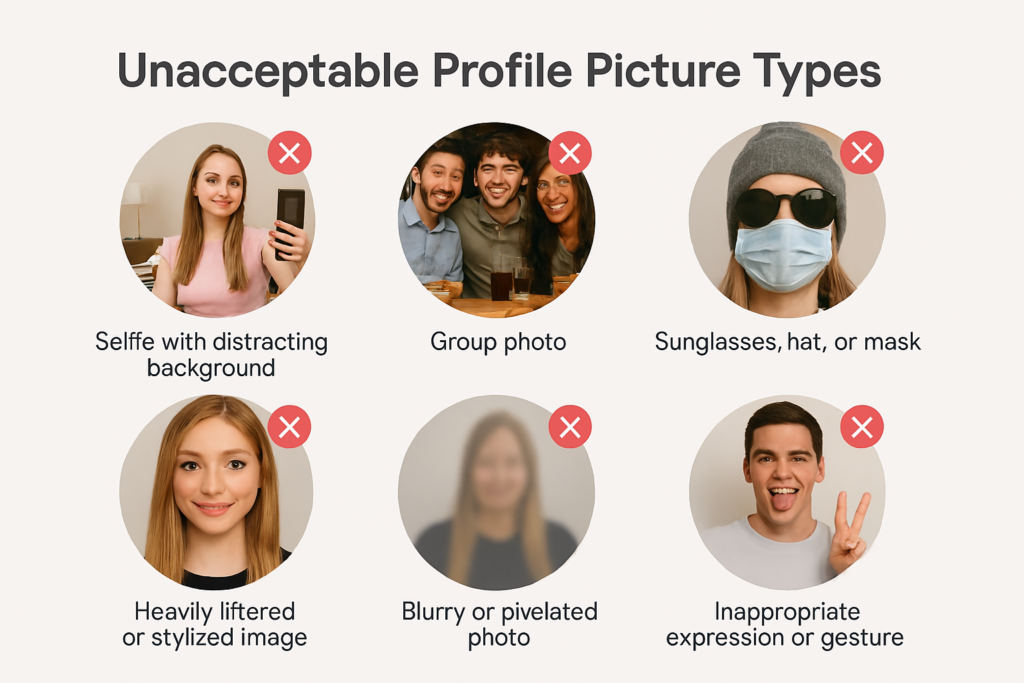
🚫 Photos We Can’t Accept
To keep Gooprep professional and safe, avoid these:
Logos, contact details, or watermarks
Group photos or anyone else in the image
Filters, borders, frames, or heavy editing
Blurry or pixelated images
Black-and-white photos
Sunglasses, hats, or face masks
Photos with pets
Cropped selfies (e.g. forehead only)
Full-body or head-to-waist shots
Examples of disapproved photos
-
Do you offer exam preparation programs?
Yes, Gooprep offers BECE, WASSCE, SAT, IELTS, professional exams, and other revision programs.
-
How are tutors selected or verified?
Tutors undergo a verification process including identity confirmation, academic qualification
review, and teaching assessment. -
What is Gooprep?
Gooprep is a digital tutoring platform that connects students and parents with qualified and
verified tutors for one-on-one or group lessons, online or in person. -
Who can use Gooprep?
Students from Primary, JHS, SHS, Tertiary levels, resit/remedial candidates, professional exam
candidates, and adult learners.