




Have question in mind?
Search from our common FAQs
Student’s inquiry FAQ's
-
How can I delete my Gooprep Tutor or Learner account?
If you wish to delete your Gooprep account, please send an account deletion request to admin@goprep.com.
To process your request, kindly include the following information:
- Full Name
- Email Address linked to your Gooprep account
- Reason for Account Deletion
Once we receive and verify your request, your account will be deactivated within 24 hours.
Please note that deleting your account may result in the loss of access to your profile, courses, learning history, tutoring sessions, and other account-related data.
If you have any questions or require assistance, please contact us at admin@gooprep.com or support@gooprep.com
-
Guidelines for First Lessons on Gooprep
Gooprep expects all tutors to be professional, punctual, and prepared for every scheduled lesson. This is especially important for first lessons and trial sessions.
For a new student, a missed first lesson can be disappointing and frustrating. It also affects trust, not just in one tutor, but in the Gooprep community as a whole.
What happens if a tutor misses a first or trial lesson?
If a tutor does not attend a scheduled first or trial lesson, the student may report that the lesson did not take place. When this happens:
- Gooprep will notify the tutor via email and their tutor dashboard
- The tutor’s profile may be temporarily hidden from new students
- While hidden, new students cannot book lessons with the tutor
- Existing students can continue lessons as normal
Repeated missed first or trial lessons may lead to longer visibility restrictions and, in serious cases, account suspension.
Progressive actions for missed trial lessons
Gooprep applies graduated actions to encourage reliability and professionalism:
- 1st missed trial: Profile may be hidden until the tutor reviews guidance on managing availability
- 2nd missed trial: Profile may be hidden for a short period (2 weeks) and require completion of an attendance-related tutorial
- 3rd missed trial: Longer temporary profile restriction (4 weeks)
- Repeated missed trials: Extended restrictions or suspension from accepting new students
The more missed lessons recorded, the longer the restriction may last.
What if a student’s report is incorrect?
If you believe a missed-lesson report was made in error, contact Gooprep Support as soon as possible. The team will review the case and take appropriate action.
How to avoid missing lessons
To stay visible and successful on Gooprep, we recommend that tutors:
- Keep their calendar and availability up to date
- Add time off in advance when unavailable
- Avoid very short-notice bookings if they are difficult to manage
- Check dashboard notifications and messages regularly
- If an emergency occurs, communicate early with the student to reschedule or cancel properly
Clear communication and good calendar management help prevent misunderstandings and protect your profile.
Keep growing on Gooprep
Gooprep provides resources and guides to help tutors:
- Attract more students
- Improve lesson quality
- Manage schedules effectively
- Highlight skills and experience
Browse the Tutor Help Center and FAQs to keep improving and growing on the platform.
-
Choosing a Good Profile Photo
Make a friendly, professional first impression on Gooprep
Your profile photo is one of the first things students notice on Gooprep. A clear, welcoming photo builds trust, shows professionalism, and helps more students choose you faster.
Follow the tips below to get approved quickly and attract more learners.
What Makes a Good Profile Photo
Your photo should meet all of these requirements:
Face forward – Your face and eyes must be clearly visible
(exceptions allowed for religious reasons)Centered & upright – Head and shoulders centered in the frame
High quality – Clear, color photo with no filters
Simple & bright – Neutral lighting and a plain background
Friendly expression – A gentle smile, looking at the camera
Photo Upload Requirements
Maximum file size: 5MB
Image dimensions: 1000px × 1000px
Accepted formats:
.jpgor.png💡 This is not a passport photo. Smile like you’re welcoming a student to their first lesson.
Examples of approved profile photos

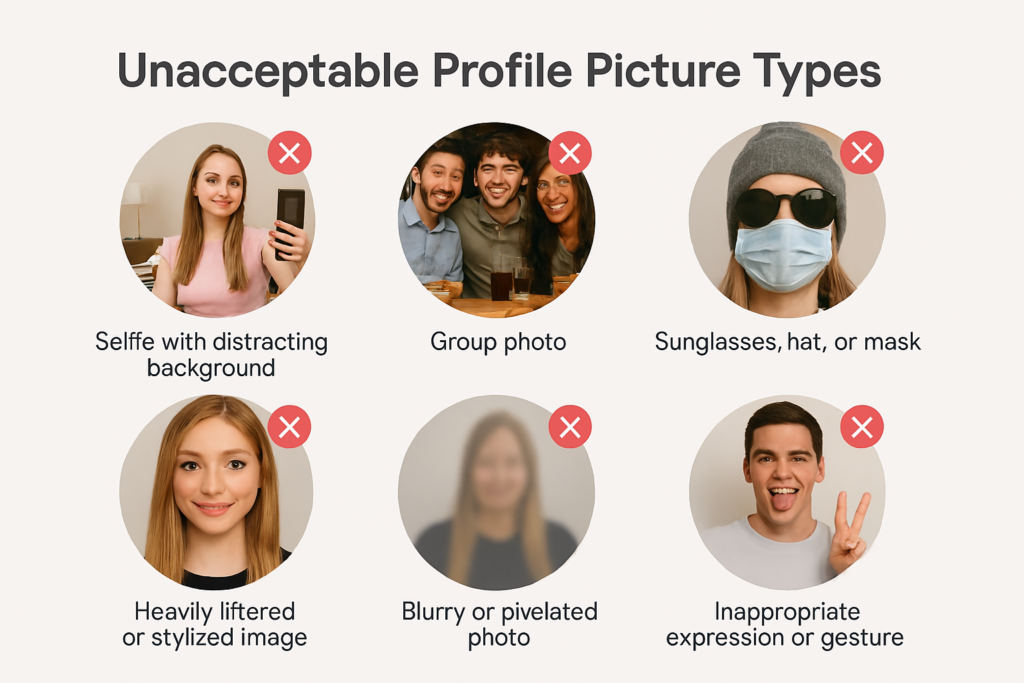
🚫 Photos We Can’t Accept
To keep Gooprep professional and safe, avoid these:
Logos, contact details, or watermarks
Group photos or anyone else in the image
Filters, borders, frames, or heavy editing
Blurry or pixelated images
Black-and-white photos
Sunglasses, hats, or face masks
Photos with pets
Cropped selfies (e.g. forehead only)
Full-body or head-to-waist shots
Examples of disapproved photos
-
What happens if I am not satisfied with a tutor?
You can request to change your tutor or contact support for assistance.
-
How do I track my learning progress?
Students and parents can access learning reports, attendance, and performance updates through
the platform. -
How do I pay for lessons?
Payments are processed securely through available channels such as Mobile Money, bank transfer,
or card payment. -
How are tutors selected or verified?
Tutors undergo a verification process including identity confirmation, academic qualification
review, and teaching assessment. -
Who can use Gooprep?
Students from Primary, JHS, SHS, Tertiary levels, resit/remedial candidates, professional exam
candidates, and adult learners. -
How does Gooprep work?
Simply sign up, select your level and learning needs, choose a tutor, book a session, and start
learning, either online or face-to-face. -
Can lessons be done in person or only online?
Both options are available depending on tutor availability and location preference.